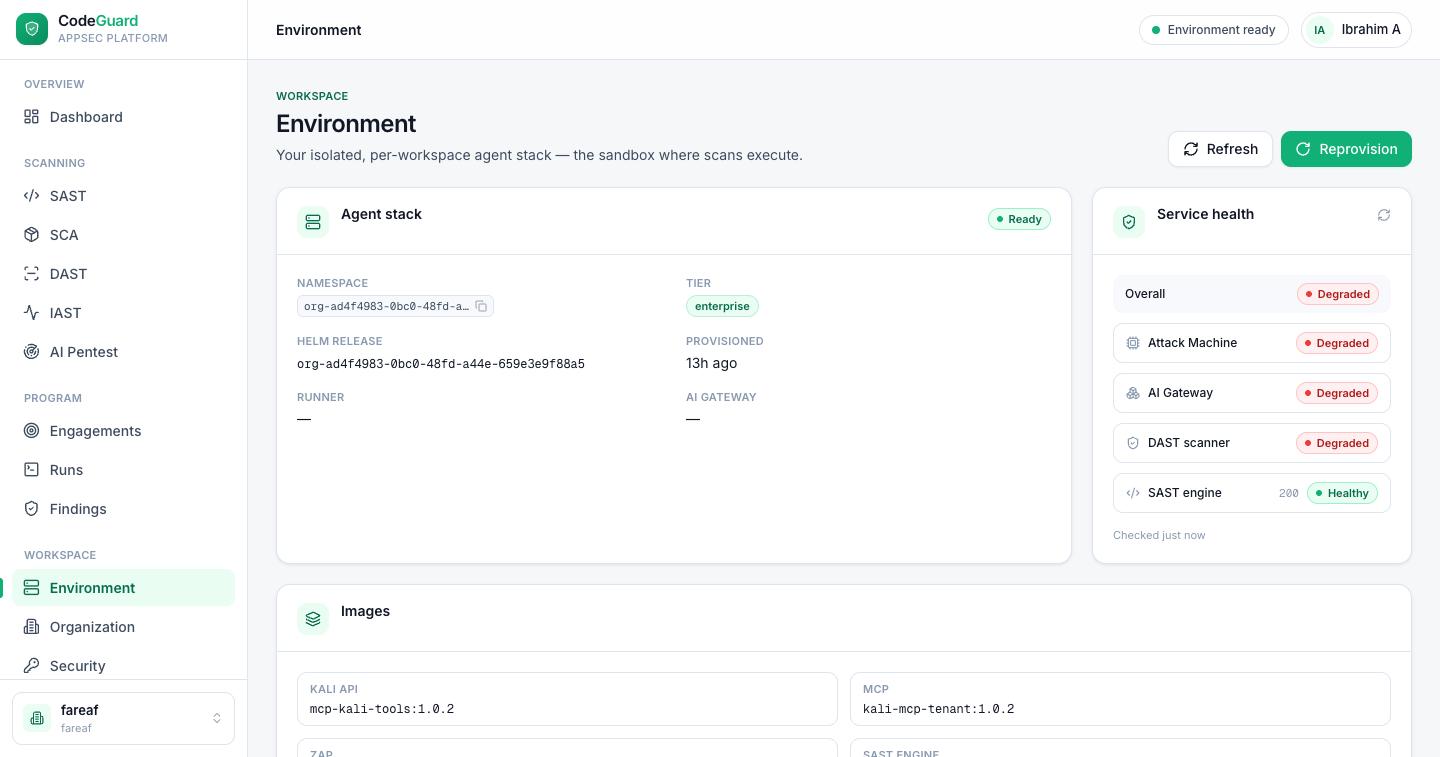
Every workspace gets its own isolated, per-workspace agent stack — the
sandbox where your dynamic scans actually execute. The Environment page is where you see
that stack's status, check the health of each service, and reprovision it if something goes
wrong.
app.codesguard.io/dashboard/environment
The Environment page: your workspace's agent stack, per-service health, and the tool image versions it runs.
What the environment is
When you scan a live application, that work doesn't run on shared infrastructure — it runs
inside an isolated per-workspace tenant. Each workspace gets its own
dedicated agent stack: a private namespace, provisioned as its own Helm
release, containing the attack tooling, AI gateway and scanner that your scans drive.
This is where DAST and AI Pentest
scans execute — inside your own sandbox, isolated from other workspaces.
SAST is different: it doesn't need the tenant sandbox and instead
uses the shared SAST engine.
At the top of the page, two actions let you manage the stack:
Refresh
Re-reads the current status and health of the stack without changing anything.
Reprovision
Rebuilds the tenant stack from scratch — use this when a service is stuck or degraded and won't recover on its own.
One stack per workspace
The environment belongs to your active workspace. If you
switch workspaces, you're looking at a different, fully isolated stack with its own
namespace and health.
Two things run on your side, not in the sandbox
The IAST agent runs inside your own CI or staging service and
reports to the IAST collector over a revocable per-project token. And for
SAST, you can point a scan at your own private npm, Maven or
Composer registry — those credentials are write-only and used only while that scan runs.
Agent stack
The Agent stack card describes the tenant that was provisioned for your
workspace. Its fields tell you what's running and how it was built:
Status
The overall state of the stack — for example Ready once it's provisioned and available.
Namespace
The isolated namespace your tenant runs in.
Tier
The resource tier the stack was provisioned at (for example enterprise), which follows your plan.
Helm release
The name of the Helm release that deployed the stack.
Provisioned
How long ago the stack was created (shown as a relative time, e.g. “2 days ago”).
Scan runner
The runner that executes scan and testing commands inside the sandbox.
AI gateway
The gateway the autonomous agents call for model access.
Service health
Below the stack card, the Service health section gives you an
Overall status plus a health reading for each individual service in the
sandbox. Each service reads either Healthy or
Degraded:
Scan runner
The sandboxed host that executes active scan and testing commands.
AI gateway
The gateway the AI Pentest agents use to reason and drive the run.
The shared engine behind SAST and SCA. When it's healthy it also shows an HTTP status (for example 200).
IAST collector
The authenticated endpoint that receives reports from your in-process IAST agents. Your agent runs in your own CI or staging environment and reports in over a per-project token you can revoke at any time.
Login-capture browser
The streamed remote browser used to capture an authenticated session for DAST and AI Pentest — any MFA or SSO included.
What each service means for launching a run:
If the Scan runner, AI gateway or
Dynamic scanning engine is Degraded,
DAST and AI Pentest runs can't start
until those services recover.
SAST and SCA only need the
Static analysis engine to be Healthy — they
don't depend on the rest of the tenant stack.
IAST runs on your side; it only needs the
IAST collector reachable so your agents can report findings in.
A Degraded service blocks the scans that depend on it
A degraded service means that part of the sandbox isn't answering as expected. Dynamic
work — DAST and AI Pentest — won't start until the Scan runner, AI gateway and Dynamic
scanning engine are healthy again. If a service stays degraded, use Reprovision
to rebuild the tenant stack, then Refresh to confirm it came back healthy.
Pinned engine versions
The environment pins specific engine versions for your tenant, so the
stack is reproducible and a scan run today behaves identically to one run next month. The
Versions section lists the pinned version of each core component:
Scan runner
The sandboxed runtime that runs scan and testing commands.
Agent toolkit
The offensive toolkit the AI Pentest agents drive.
This is the place to check exactly which versions your workspace's tenant runs — useful
when you're comparing results over time or confirming a fix landed. Because versions are
pinned per workspace, your results stay reproducible across runs.