Billing & plans
Your plan determines which modules you can use and how much you can scan. The Billing page is where you see your current subscription, track usage against your limits, and review available plans.
What the Billing page shows
Open Billing from the sidebar (under Workspace). It's organized into a few panels:
Modules are plan-gated
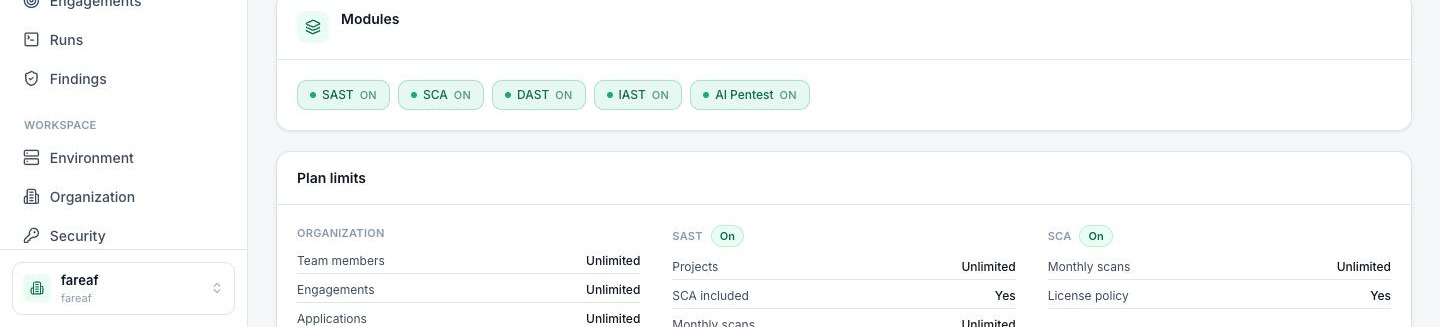
The headline difference between plans is which modules they unlock. Each plan enables some combination of the five testing modules. SAST is on every plan, and SCA (dependency checks) is derived from every SAST scan, so every plan has both. DAST, IAST and AI Pentest unlock on higher tiers. Enabled modules show an On state on the Billing page and appear normally in the sidebar.
The plan tiers are Trial, Starter, Pro and Enterprise. Roughly how the modules map to them (the app is always the source of truth):
| Module | Trial | Starter | Pro | Enterprise |
|---|---|---|---|---|
| SAST | On | On | On | On |
| SCA with SAST | On | On | On | On |
| DAST | On | — | On | On |
| IAST early access | — | — | — | On |
| AI Pentest | Recon | — | — | Deep |
Exact entitlements are set per subscription — talk to sales for specifics. IAST is in early access with a JVM agent first; AI Pentest runs under a profile that also depends on your plan (see below).
When a module isn't in your plan, it doesn't disappear — it shows a locked state so you always know it exists:
- In the sidebar, the module is greyed with an Upgrade badge and links to Billing.
- Opening the module shows an “not in your plan” panel with an upgrade prompt instead of the tool.
Depth within a module is plan-gated too
Beyond on/off, two modules offer deeper capabilities on higher plans:
SAST resolution tiers
How completely SAST resolves the types behind your dependencies depends on your plan:
AI Pentest profiles
An AI Pentest run executes under a profile that sets how far the swarm goes:
Usage meters & plan limits
Every plan grants a set of quotas, and CodesGuard meters your consumption against them in real time so there are no surprises. Depending on your plan, tracked usage can include:
- Workspace — team members and workspaces (organizations) you can create.
- SAST — number of projects, monthly scans, and concurrent scans.
- SCA — whether it's included, and scan volume.
- DAST / AI Pentest — scans, runs, run minutes, and maximum run duration.
- IAST — connected agents and the projects they report into (Enterprise early access).
- Storage — total storage, maximum upload size, and how long results are retained.
Plan limits are grouped on the Billing page by area (workspace, per-module, storage, tenant, support), each with its quota — so you can see exactly what your plan allows before you hit a limit.
Changing your plan
Review the plans available to you under Available plans on the Billing page and upgrade (or contact sales) from there. When you change plans, module access and limits update to match. Managing members and workspaces is covered in Organizations.